Footer
In MapStore some of the map information are reported in the Footer. By default, as soon as the user opens the map, the scale bar and the scale switcher are showed so that the user can change the scale bar by zooming in/out the map or by selecting a map scale through the scale switcher.

In order to visualize the map coordinates corresponding to the mouse pointer in the selected Coordinate Reference System of the map, the user can click on the button 

CRS Selector
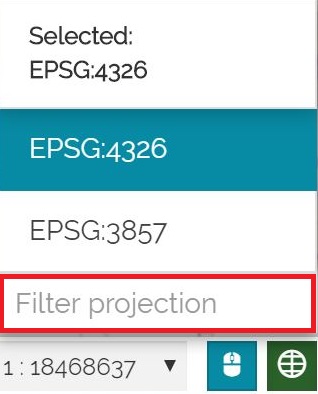
MapStore allows also to change the Coordinate Reference System of the map by clicking on the Select Projection button  . A CRS selector opens to select one of the available CRSs, as follows:
Note
The list of available CRSs depends on the CRS Selector configuration.
In order to search a desired CRS, the user can also filter the CRS list by typing in a search input field.
Note
If the map viewer mode is set to 3D Navigation the user can view the Camera Position in the Footer. By clicking the  button, the user can access the following options:

-
View the camera coordinates (
Lat,Lng, andAlt), which update dynamically as the camera position changes in the viewer -
Select the available CRS
-
Select the available Height options
Warning
The Camera Position tool is not enabled by default in MapStore. However, it can be configured within application contexts if needed.